


EverythingWeather
4.4145.00 Reviews
App Specs
- Version
- 1.6.0
- Updated On
- License
- Free
- Downloads
- 10,000+
- Developer
- corymottice
- Categories
- Weather
- Platform
- Android
Screenshots
 Analysis by AppCompare
I often check the weather for a practical reason rather than curiosity: deciding whether to walk, take the car, or move an errand to later. EverythingWeather is aimed at that everyday habit, with forecasts and weather information sourced directly from NOAA’s National Weather Service. I like that clear focus. It gives the app a useful point of difference from weather apps that combine forecasts with news feeds, lifestyle suggestions, and a lot of visual extras.
It is a free weather app from developer corymottice, with optional in-app purchases ranging from $3.99 to $34.99 per item. Its current version is 1.4.35, and it is rated for Everyone. Those details make it approachable to try, though “free” does not mean every possible option is necessarily included at no cost. I would start with the basic experience and decide whether any paid offering is worth it for your own routine rather than assuming you need to buy anything.
What the NOAA connection means in everyday use
Using information from the National Weather Service is a meaningful choice, especially for people who want a weather-focused tool rather than a broad discovery app. It gives the app a defined source for its forecasts, but it does not make every prediction certain: weather can change, and conditions can differ over a short distance. I treat a forecast as helpful guidance, not a promise, particularly when plans depend on a narrow window of good weather.
The source also shapes who is most likely to appreciate this app. If you want to consult a service closely tied to the U.S. National Weather Service, EverythingWeather has a sensible appeal. If you live elsewhere, or routinely need a provider tailored to another country, I would compare its local usefulness with the weather service you already trust before making it your only option.
How I would use it before heading out
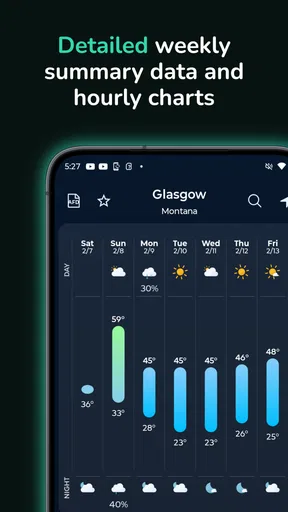
For an ordinary day, I would check the broad conditions first, then look at the hourly view if the timing matters. That small two-step habit is more useful than repeatedly refreshing a general forecast: it helps answer whether to leave earlier, carry a layer, or postpone an outdoor task. A forecast is most valuable when it changes a decision, and that is where a focused weather app can earn a place on my home screen.
For example, if I had a walk planned after work and rain looked possible, I would check the hourly outlook before setting off in the morning, then take another look before leaving. The first check helps me plan; the second helps me respond to changing conditions. I would use the radar as a second perspective when a shower seems close, while remembering that a map is a guide to weather movement, not a guarantee about the exact conditions on my street.
Where it fits among weather apps
Compared with a typical all-purpose weather app, EverythingWeather’s appeal is its direct NOAA National Weather Service connection and straightforward weather-first purpose. Some alternatives may be a better fit if you want a highly polished news feed, lifestyle recommendations, or a service designed around another region. In my view, the right comparison is not which app has the most screens; it is which one answers your actual question quickly and gives you enough context to act.
Worth Reading Before You Choose

Flipboard Shows What News Apps Must Do Beyond the Feed

Switching to Android Auto Means Rethinking Your Driving Routine

Google Calendar Makes a Crowded Week Easier to Manage

Ludo King Makes the Most of the Minutes Between Plans

Baby Panda World Brings Quick Play to Modern Phones, but Its Game Library Feels Busy

ESPN’s Live Game View Makes Following Close Games Easier
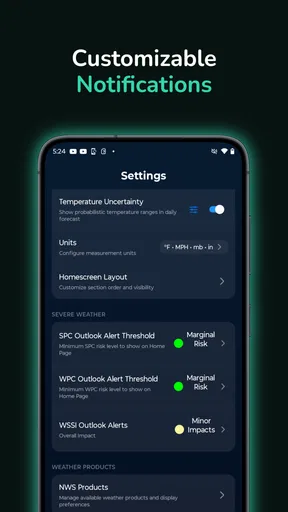
It is also worth considering how you like to receive information. A person who checks forecasts manually may value a clean overview, while someone who wants reminders may care more about whether alerts can be adjusted to match their routine. I would set only the notifications that could change what I do—such as a relevant rain or temperature warning—so useful messages do not become background noise. If you already rely on another app’s alerts, test the new setup before turning off the old one.
What’s the Buzz About?
So, what’s the deal with EverythingWeather? It’s basically like having a personal weather station right on your phone. The app is available for both Android and iOS, and it’s packed with features that make it stand out from the crowd. Whether you’re planning a weekend getaway or just curious about whether you’ll need an umbrella for that coffee run, this app has got you covered.
Interface and Design
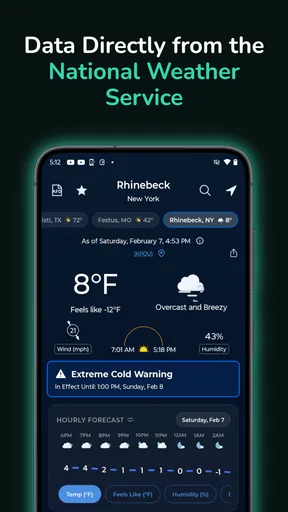
First things first, let’s talk about the interface. It’s clean, intuitive, and downright easy to navigate. When you open the app, you’re greeted with a dashboard that gives you a snapshot of the current weather conditions, including temperature, humidity, and wind speed. It’s like getting all the juicy deets without having to dig through endless menus.
The design is sleek and modern, with vibrant graphics that keep things visually interesting. The color scheme is easy on the eyes, making it a pleasure to use even on those groggy mornings when you haven’t had your coffee yet.
Features that Make a Difference
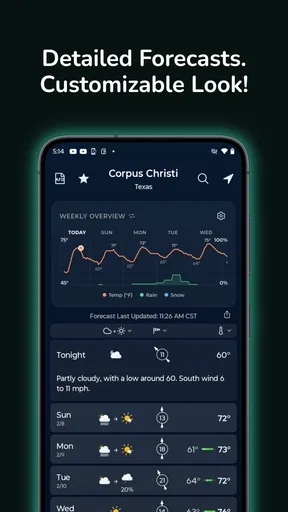
Let’s dive into the features because this is where EverythingWeather really shines. One of my favorites is the hourly forecast feature, which is a lifesaver if you’re trying to plan your day. You get a detailed breakdown of what the weather will look like hour by hour, so you can decide if that afternoon jog is a good idea or not.
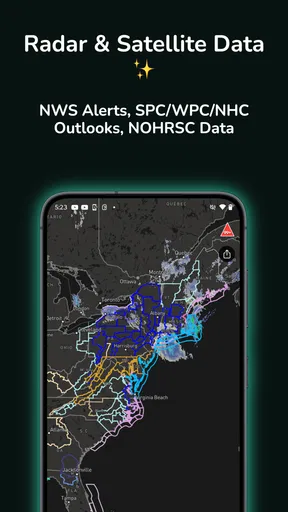
Another cool feature is the radar map. This is perfect for those of us who like to track storms or just want to see what’s brewing in the sky. The map is interactive, allowing you to zoom in and out and get a real-time view of weather patterns in your area.
Customization and Alerts
Now, let’s talk customization. The app lets you set custom alerts, which is super handy. Whether it’s a heads-up for rain or a warning about extreme temperatures, you can tailor the notifications to suit your needs. This means you’re never caught off guard by unexpected weather changes.
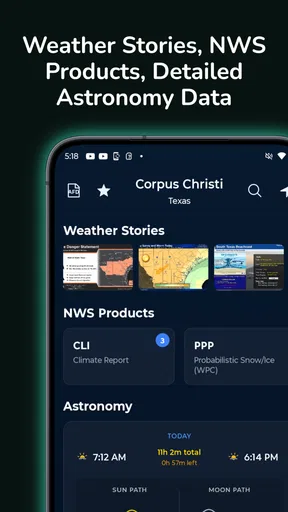
And if you’re someone who likes to personalize things, you’ll appreciate the ability to customize the app’s appearance. You can choose from different themes and layouts, making the app truly yours.
Usability and Performance
Performance-wise, EverythingWeather is smooth sailing. I haven’t experienced any lag or crashes, which is a big plus in my book. The data loads quickly, so you’re not left waiting around for updates. It’s reliable, consistent, and works like a charm, even in areas with spotty internet connectivity.
For the most dependable picture, I would use the dashboard as a quick check and reserve the radar for decisions where timing matters. A radar display is useful when I want to see whether weather is approaching, but it can feel like too much detail when I only need to know if the day is generally warm or cold. This is a small workflow distinction, yet it keeps the app helpful rather than turning every forecast check into a long session.
Practical limits and who should look elsewhere
No forecast app can remove uncertainty, and I would not treat a single screen as enough preparation for a high-stakes outdoor plan. For a commute or casual walk, a quick forecast and a look at the radar can be plenty. For a long drive, a remote hike, or work that depends on safe conditions, I would check the relevant official advisories as well and reassess close to departure. That is not a knock on this app; it is a sensible boundary for any phone forecast.
There is also a difference between having customization and needing to configure everything. If you prefer an app that makes decisions for you with prominent summaries and minimal setup, a simpler alternative may feel more immediate. Conversely, if you enjoy checking weather details and adjusting alerts to suit your schedule, the options described here may be a better match. I would keep notifications selective and avoid treating an alert as a substitute for checking current conditions when the stakes are higher.
People who want a weather app centered on NOAA’s National Weather Service are the clearest audience for EverythingWeather. It can also suit anyone who wants hourly planning and a radar view without making weather one part of a larger content feed. I would be more cautious if I needed a provider built around a different country, or if my priority were a particular extra service rather than a direct weather reference. Checking the forecast for the places you actually visit is the best way to judge whether it fits your life.
How I would make it useful without overchecking
A practical routine is to check once while planning the day, then revisit the forecast only when the timing of an outdoor plan is close. For a school pickup, a short dog walk, or a trip to the store, that means using the hourly view to choose a comfortable window rather than watching the radar constantly. If rain is the concern, I would compare the broad forecast with the map, then make a simple backup plan—an umbrella, a different route, or a later departure. The value is in turning information into a decision, not in staring at every weather detail.
For households with different schedules, alerts can be more useful when each person has a clear reason for receiving them. A rain notice may matter to someone cycling to work, while a temperature warning may matter more to someone planning time outdoors. I would avoid duplicating every notification across devices, because repeated alerts can make it easier to ignore the one that matters. A quick review of alert settings after a change in routine can keep them relevant.
Version, maturity, and what to watch
EverythingWeather was released on March 10, 2025, and its current version is 1.4.35. That gives a useful snapshot of where the app stands, but a version number by itself does not tell me which features changed or how those changes affect a particular phone. Existing users can judge updates most practically by checking whether the current forecast workflow, alerts, and display remain comfortable for them after installing a new version. I would keep expectations tied to changes I can actually see rather than assuming a release number promises a specific improvement.
The app has more than 10,000 installs and a 4.4 average from 275 ratings, with 120 written reviews. That is a helpful sign that other people are using and evaluating it, but I would not use popularity alone to decide whether its weather source and way of presenting information suit me. The more useful test is personal: does it show the information I need quickly, and do I trust it enough to plan an ordinary day while still checking further when conditions matter?
Its minimum operating system is version 7.0, which gives many older devices a chance to run it. I would still make the first check on the phone I intend to use, then see whether location and forecast results behave as expected in the places I care about. If I switch between home, work, and regular weekend destinations, I would test each location before relying on the app for an outing. That simple check can expose a mismatch between an app’s general appeal and the way its forecasts serve a particular routine.
Why You’ll Love It
So, why should you give EverythingWeather a try? Well, if you’re someone who likes to stay informed and prepared, this app is a must-have. It’s comprehensive yet user-friendly, and it offers all the information you need at your fingertips. Plus, it’s free to download, so there’s really no downside to checking it out.
In a world where weather can be unpredictable, having an app like EverythingWeather is like having a reliable friend who’s got your back. Whether you’re a weather enthusiast or just someone who likes to plan ahead, this app is a valuable tool that delivers on all fronts.
So, go ahead, download it and see for yourself. With EverythingWeather, you’ll never have to wonder if you should bring that raincoat again!
Pros
- User-friendly interface with intuitive navigation.
- Accurate real-time weather updates.
- Customizable alerts for severe weather.
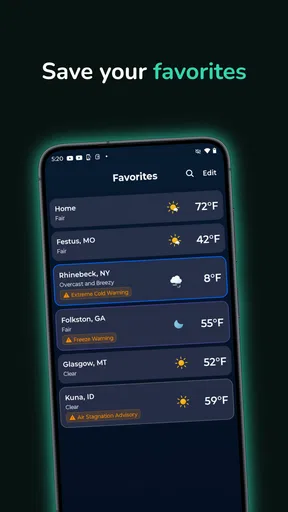
- Detailed forecasts for multiple locations.
- Includes radar and satellite imagery.
Cons
- Ads can be intrusive at times.
- Requires internet for updates and features.
- Limited features in the free version.
- Battery consumption is slightly high.
- Some locations lack detailed data.
FAQs for EverythingWeather
What features does the EverythingWeather app offer?
EverythingWeather provides a comprehensive suite of features including real-time weather updates, detailed forecasts, radar maps, and severe weather alerts. Users can also customize notifications based on their location and preferences. The app supports multiple locations, allowing you to track weather conditions for different areas seamlessly.
Is EverythingWeather free to use, or does it require a subscription?
EverythingWeather offers a free version with basic features, but for an enhanced experience, users can opt for the premium subscription. The premium version includes ad-free usage, advanced radar features, and access to extended weather forecasts, providing a more in-depth and uninterrupted weather tracking experience.
How accurate are the weather forecasts in EverythingWeather?
EverythingWeather utilizes data from multiple reliable sources, ensuring a high level of accuracy for its weather forecasts. The app updates frequently and uses advanced algorithms to provide precise weather predictions, making it a trusted choice for users who need reliable weather information.
Does EverythingWeather support notifications for severe weather alerts?
Yes, EverythingWeather provides customizable notifications for severe weather alerts. Users can set up alerts to receive timely warnings about storms, heavy rainfall, or other severe conditions. This feature helps users stay informed and take necessary precautions when adverse weather is expected.
Is there a community or support available if I encounter issues with EverythingWeather?
EverythingWeather offers a robust support system, including a help center and FAQ section within the app. Users can also reach out to customer support via email or through the app’s support portal. Additionally, the app’s community forums allow users to connect, share tips, and troubleshoot common issues together.


